Build an equipment maintenance tracker by describing it.
Machines, locations, scheduled jobs, and a dashboard of what's overdue. Here's the exact prompt we typed, the app it produced, and how long it took.
Ask for it in one go
This is the exact prompt we used. Copy it, change the words that don't match your business, and paste it in.
Track our equipment and its maintenance. Each machine has a location, a serial number and a person responsible. Maintenance jobs are scheduled per machine with a due date, and each job goes from due to in progress to done. Only supervisors can mark a job done. Show me overdue jobs on a dashboard.
Built in 76 seconds, from that prompt alone.
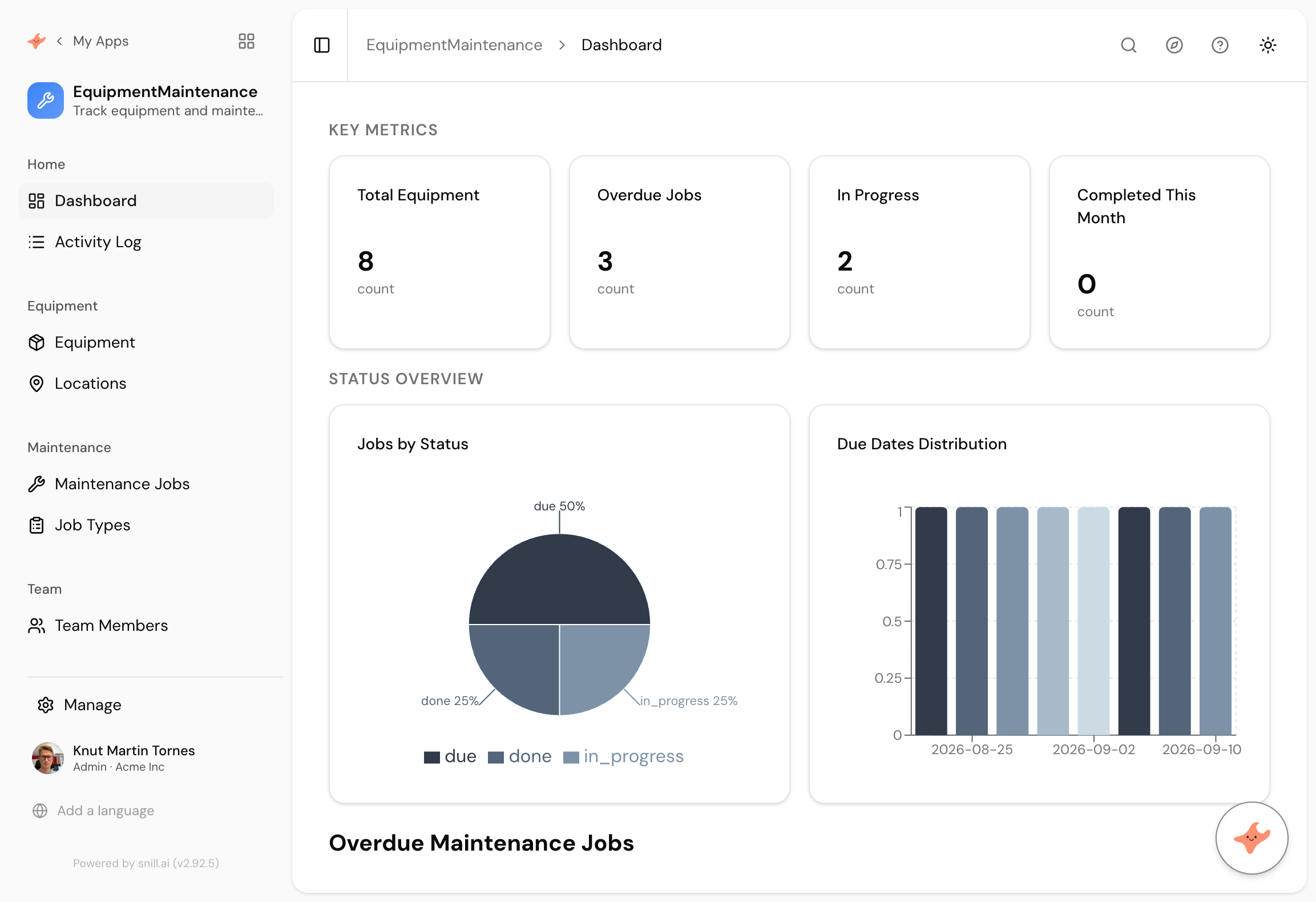
What came back
Five connected collections
Equipment, Locations, Maintenance Jobs, Job Types, and Team Members. We mentioned a location once, in passing, and it made Locations its own collection with the machines looking up to it.
A workflow that's actually enforced
Jobs move due to in progress to done, and the record shows who the next step is waiting on. The restriction we asked for is a rule on the data, not a hidden button.
A dashboard nobody designed
Total equipment, overdue jobs, work in progress, completed this month, plus a status breakdown and a due-date chart. It also added a Days Overdue field we never mentioned.
Most equipment maintenance runs on a spreadsheet and somebody’s memory. That works until the person who keeps it leaves, or the sheet grows a second tab, or somebody needs to know what’s overdue and the honest answer is that nobody is quite sure.
The software that fixes this isn’t complicated. It’s a list of machines, a list of jobs against them, a rule about who can sign a job off, and a screen that shows what’s late. What makes it expensive is that no off-the-shelf product matches how your site actually works, and building it properly means a database, users, roles and an audit trail before you write a line of the part you care about.
What you don’t have to describe
That’s the useful bit. The prompt above says nothing about logins, permissions, an audit trail, or an API, because none of that is generated. It’s already there, the same in every Snill app, so the only thing you describe is what’s specific to you: your machines, your jobs, your rule about supervisors.
It’s the reason this took a minute rather than a sprint, and the reason the tenth app you build costs the same as the first. If one of the ready-made templates already matches what you need, starting there is faster still.
The parts we didn’t ask for
Reading the prompt back, we never mentioned Locations as a thing in its own right. We wrote “each machine has a location”, and it decided that was a collection worth having, with the equipment looking up to it. Same with Job Types, and with the Days Overdue field on the dashboard.
That’s the part worth watching when you try this yourself. It fills in the obvious neighbours of what you described, and it’s usually right. When it isn’t, you say so and it changes.
Summary
An equipment maintenance app is a small system with a few strict rules, which is exactly the kind of thing that’s annoying to buy and slow to build. Describing it took one paragraph and about a minute, and what came back had the collections, the workflow, the permission rule and a dashboard, with sample data already in it. If your version needs a cost field, a photo, or a report by location, you ask for those next, and you approve each change before it lands. And if your crew doesn’t work in English, you can run the same app in their language without touching the data underneath.
Then change it by asking
The assistant stays with the app after it is built. It proposes each change and a person approves it, so nothing moves on its own.
- Add a cost field to each maintenance job and total it per machine.
- Technicians should only see the jobs assigned to them.
- Add a photo to each job so the technician can attach a picture of the fault.
- Give me a monthly report of completed jobs by location.
Frequently asked.
Do I have to use this exact prompt?
No, and you shouldn't. Change the words to match how your business actually talks. If you call them assets rather than machines, or rounds rather than jobs, write that. The app uses your words, so the people who open it recognise their own vocabulary.
What if what it builds isn't quite right?
You say what's wrong and it changes. Adding a field, renaming a collection, tightening a permission, and adding a dashboard are all things you describe rather than configure. Every change is proposed first and applied only when you approve it, and you can roll back to any earlier version of the model.
Is there a ready-made template for this?
Not for equipment maintenance specifically. There's a gallery of ready-made templates for things like expense approval, contract renewals and incident reporting, and any of them is a faster start if one matches. Otherwise describing it takes about a minute.
Can the team use it in their own language?
Yes. Ask the assistant to translate the app and every label, page title and dropdown is translated. Each person picks their language and the app re-renders, while the values stored underneath never change.
What does it cost?
Snill is free to start for solo operators, with a Pro plan for teams. Your data and the app's full model are yours to export at any time, as CSV or JSON, and every app ships a REST API with an OpenAPI 3.0 spec.
Describe it and see
Free to start. The app is generated in a minute or two, and you keep changing it in plain language.
Start free