Build a policy review tracker by describing it.
Which policies are due for review, who owns them, and what version people are actually reading. Here's the prompt and the app it produced.
Ask for it in one go
This is the exact prompt we used. Copy it, change the words that don't match your business, and paste it in.
Keep track of our policies and procedures. Each document has an owner, a version number, an approval date and a review due date, usually once a year. A document goes from draft to in review to approved. Only the quality manager can approve one. Show me what is due for review in the next 60 days.
Built in 98 seconds, from that prompt alone.
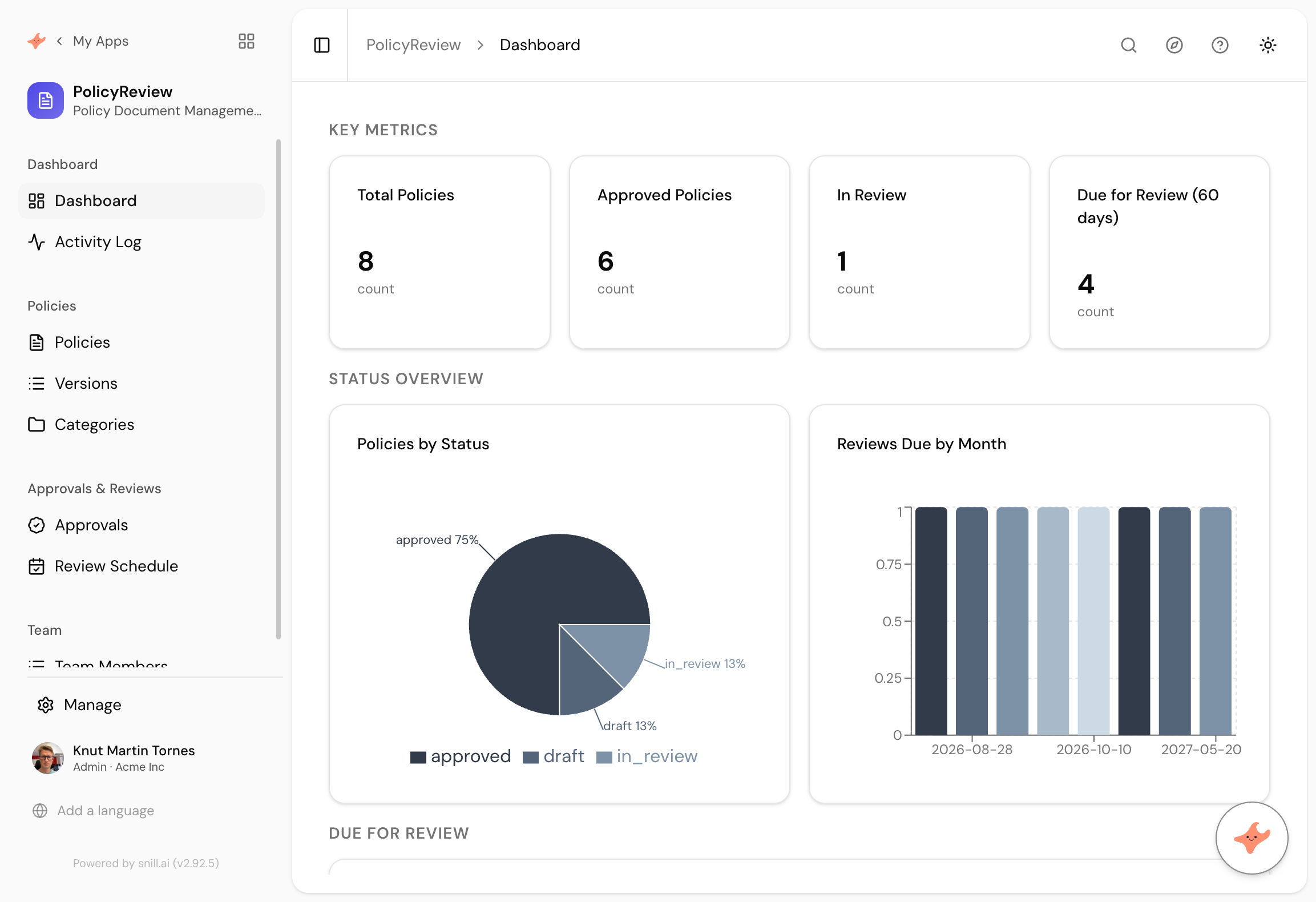
What came back
Six collections from one paragraph
Policies, Versions, Categories, Approvals, Review Schedule and Team Members. Versions being separate is the part that matters, because it means the document has a history rather than being overwritten.
An approval step with a name on it
Draft to in review to approved, with the approval restricted to one role. The rule sits on the data, so it holds through the API as well as the screen.
The review calendar you never build
Reviews due by month, plus a count of what falls due in the next 60 days. This is the thing that quietly never gets built when policies live in a folder.
Policies are written once and then quietly rot. The version in the shared folder says 2.1, the version on the intranet says 1.4, and the review date everyone agreed to has passed twice. Nobody is being careless. There is simply no screen anywhere that says which documents are due.
That screen is the whole app. A list of policies, an owner for each, a version history so you can prove what the rule was at a given date, and a date that says when somebody has to look at it again.
The version decision
We wrote one clause about a version number, and it made Versions a collection of its own rather than a field on the policy. That is the right call and it is not obvious. A version number on the policy record gets overwritten and the old rule vanishes. Versions as records means the history survives, which is the only reason anyone tracks policies in the first place.
It also created Categories and a Review Schedule that we never named, and put an approval step behind a single role, exactly as asked.
The bit we had to fix
The sample data came with review dates in 2025, so measured against today nothing was due and the panel was empty. Same failure we have hit on every use case where a date is compared against now.
One message fixed it: we said the dates were stale, gave the mix we wanted, and approved the changes the assistant proposed. The register then showed four policies due inside 60 days, which is what a real one looks like in September.
Summary
A policy register is a small app whose entire value is one date column and a screen that watches it. This one took 98 seconds from a paragraph, and arrived with versions kept as history, categories, a review schedule and an approval step restricted to one role. The sample review dates needed a single correction. If you want file uploads, per-owner views or a link to the standard each policy serves, those are the next three sentences.
Then change it by asking
The assistant stays with the app after it is built. It proposes each change and a person approves it, so nothing moves on its own.
- Let people upload the actual document file against each version.
- Show each owner only the policies they are responsible for.
- Add a field for which standard or regulation each policy relates to.
- Give me a report of everything approved in the last twelve months.
Frequently asked.
Does this store the documents themselves?
Not out of the box, because the prompt did not ask for it. Add a file field by asking, and each version can then carry the document it refers to. The register is about who owns it, what state it is in, and when it needs looking at again.
Why keep versions as a separate collection?
Because a policy that gets overwritten has no history, and in an audit the history is the point. Separate versions means you can show what the rule was in March and who approved it, rather than only what it says today.
Can we restrict who sees which policies?
Yes. Access is set per collection and per field, and it is enforced on the server, so a policy that only managers should see is not merely hidden in the interface.
Is this a document management system?
No, and it is worth being clear. It tracks the lifecycle of documents, not their contents or their editing. If you need collaborative authoring and full text search across documents, keep the tool you have for that.
What does it cost?
Snill is free to start for solo operators, with a Pro plan for teams. Your data and the app's full model are yours to export at any time, as CSV or JSON.
Describe it and see
Free to start. The app is generated in a minute or two, and you keep changing it in plain language.
Start free