Build a supplier onboarding tracker by describing it.
Who has applied, which documents are still missing, and who is waiting on us. Here's the prompt and the app it produced.
Ask for it in one go
This is the exact prompt we used. Copy it, change the words that don't match your business, and paste it in.
Onboard new suppliers. Each supplier has a company name, a contact, a category and a country, and has to hand in documents like insurance, a tax certificate and signed terms before we can trade with them. A supplier goes from applied to under review to approved or rejected. Only procurement can approve. Show me who is waiting on us and which documents are still missing.
Built in 44 seconds, from that prompt alone.
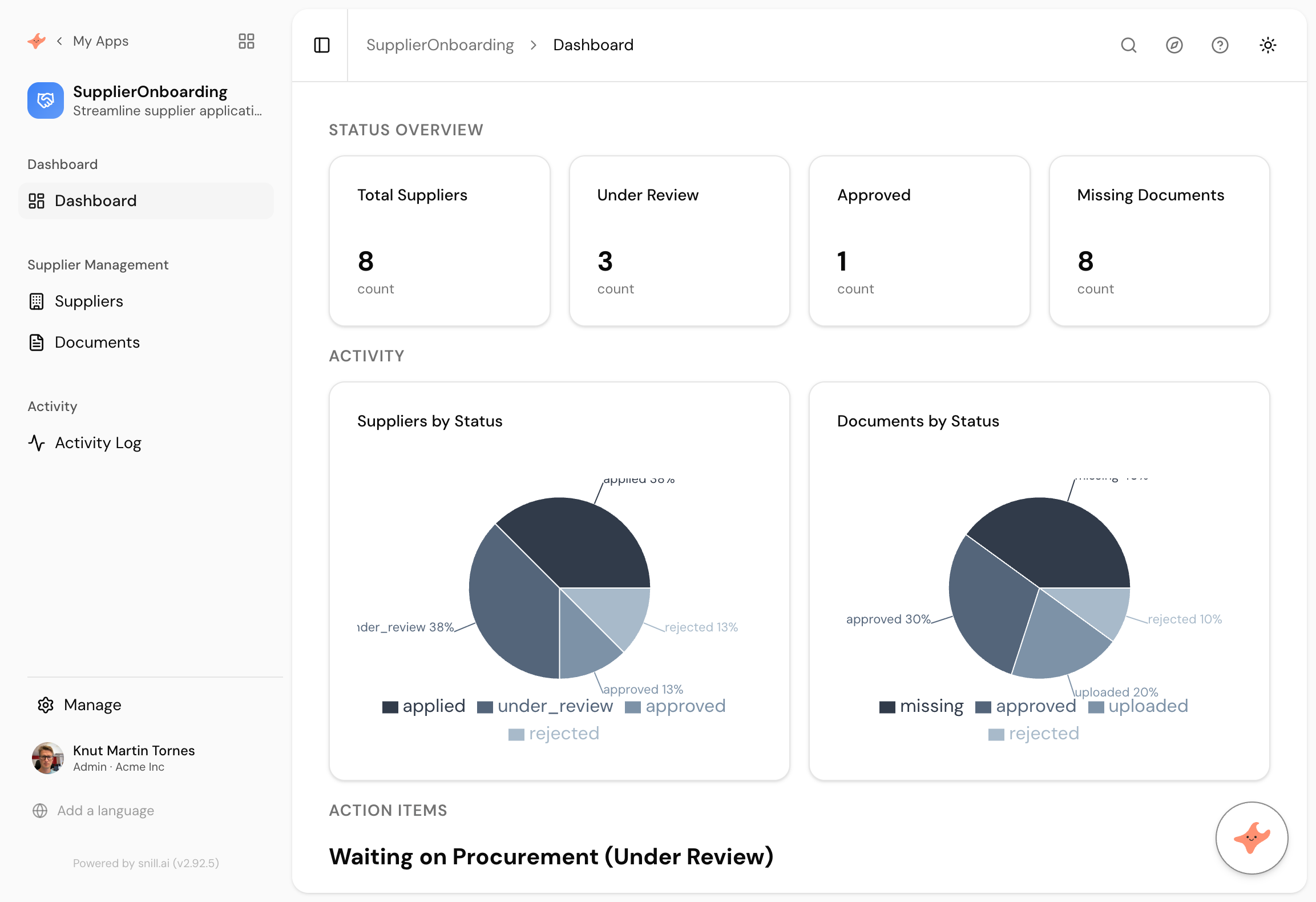
What came back
Documents as records, not checkboxes
Each required document is its own record with its own status, so insurance can be approved while the tax certificate is still missing. A tick box on the supplier could not show you that.
Two statuses that move independently
The supplier moves applied to under review to approved. Each document moves missing to uploaded to approved or rejected. The dashboard charts both, because the blocker is usually in the second one.
Approval held by one team
Only procurement can approve a supplier, which is the control that stops a department quietly starting to trade with someone who never sent their insurance.
Supplier onboarding fails in the gap between two systems. Procurement has a spreadsheet of who has applied. Somebody else has an inbox with the insurance certificates in it. Whether a given supplier is actually cleared to trade is a question that takes two people and a morning to answer.
The app that fixes it holds both halves. Where the supplier is in your process, and where each document they owe you has got to.
The part that makes it work
We wrote one sentence about documents. It made Documents a collection with its own status rather than a set of tick boxes on the supplier, and that single decision is what makes the register useful.
A tick box tells you a document is missing. A record tells you it was uploaded three weeks ago and is sitting unreviewed on your side, which is a different problem with a different owner. The dashboard charts supplier status and document status separately for exactly that reason: the supplier is rarely the reason things are stuck.
Nothing needed fixing
This one came out usable first time, in 44 seconds, the fastest of the ten apps we built this way. Its dashboard counts and groups rather than comparing dates against today, which is the pattern that reliably comes out right.
The natural next step is the one that would change that. Add an expiry date to the insurance certificate and you have the most valuable version of this app, and also the one where you should expect to spend a message fixing the sample dates.
Summary
Supplier onboarding is two processes that people usually keep in two places, and putting them on one screen is most of the value. This one took 44 seconds from a paragraph, with documents as records rather than checkboxes, and approval held by procurement. Nothing needed correcting. If you want file uploads, insurance expiry warnings or per-category views, those are the next three sentences.
Then change it by asking
The assistant stays with the app after it is built. It proposes each change and a person approves it, so nothing moves on its own.
- Let suppliers upload the actual document file against each requirement.
- Add an expiry date to insurance and warn me 60 days before it lapses.
- Show each category manager only the suppliers in their category.
- Give me a report of how long approval took, by month.
Frequently asked.
Why not just a checklist on the supplier record?
Because a checkbox cannot hold a status. Insurance approved, tax certificate uploaded but not checked, terms never sent. Those are three different states and they are the whole reason onboarding stalls. Documents as records gives each one its own life.
Can suppliers fill this in themselves?
Not from this prompt. It is an internal register of where each application has got to. If you want suppliers submitting directly you are into external user access, which is a different and larger question worth thinking about before you build.
Can we track insurance expiry as well as receipt?
Yes, and it's the most useful next sentence here. An insurance certificate that was valid at onboarding and lapsed eight months later is the risk this app exists to catch.
How is this different from a contracts register?
Onboarding is the gate before you trade. A contracts register tracks the agreement afterwards, with renewal and notice dates. There's a ready-made contract management template if that second job is the one you actually have.
What does it cost?
Snill is free to start for solo operators, with a Pro plan for teams. Your data and the app's full model are yours to export at any time, as CSV or JSON.
Describe it and see
Free to start. The app is generated in a minute or two, and you keep changing it in plain language.
Start free