Build a new starter onboarding tracker by describing it.
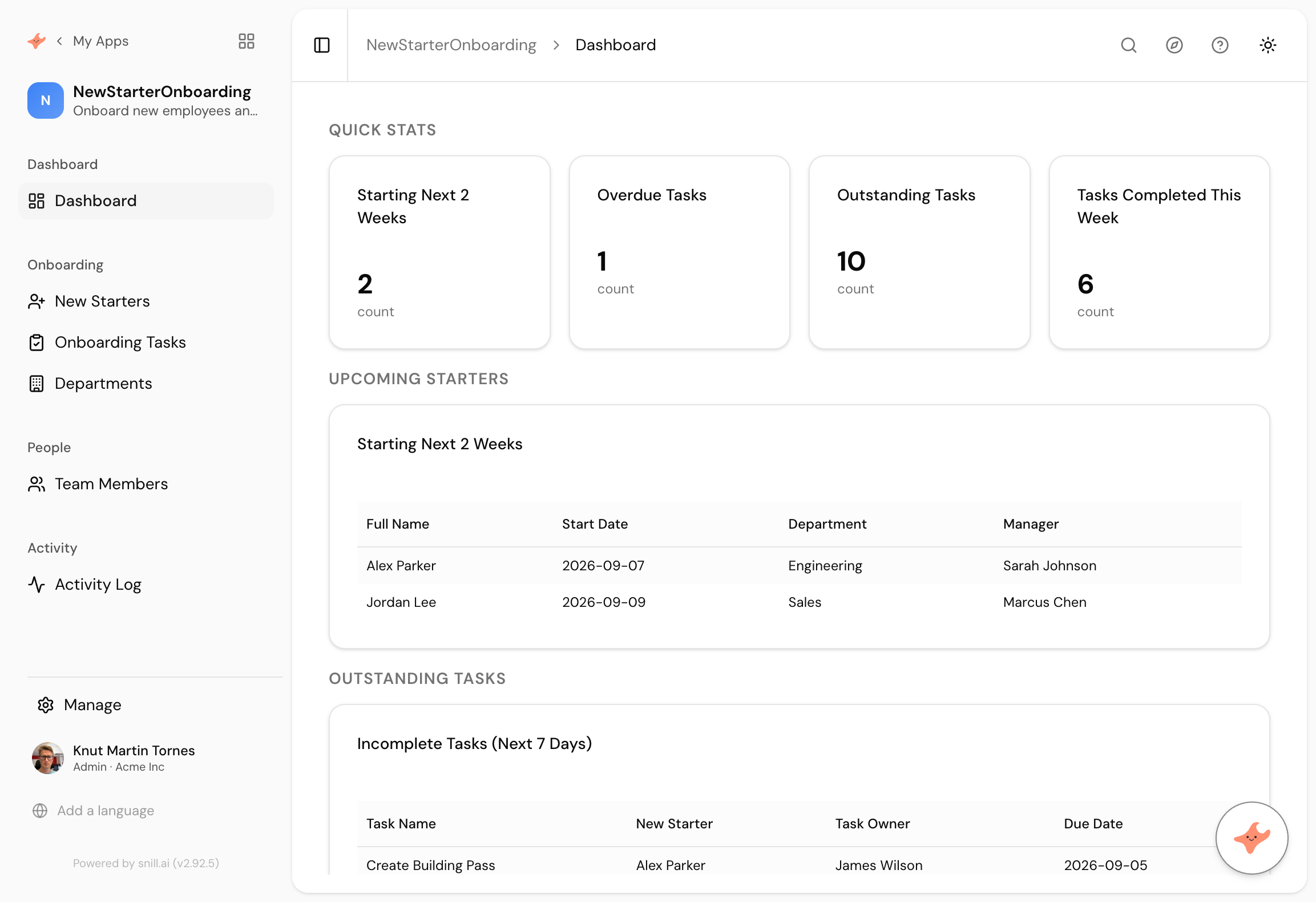
Who starts in the next fortnight, and which of their laptop, pass, payroll and induction tasks are still open. Here's the prompt and the app it produced.
Ask for it in one go
This is the exact prompt we used. Copy it, change the words that don't match your business, and paste it in.
Track onboarding for new starters. Each new employee has a start date, a manager and a department, and a checklist of tasks like laptop, building pass, payroll and induction. Each task has an owner and a due date and is either done or not. Show me who starts in the next two weeks and which tasks are still outstanding.
Built in 68 seconds, from that prompt alone.
What came back
Starters and tasks kept apart
New Starters and Onboarding Tasks are separate collections, so one person carries many tasks and each task has its own owner and due date. A checklist stuck on the employee record could not do that.
Tasks owned by the right people
The laptop task belongs to IT, payroll to finance, induction to the manager. Each task has an owner, which is what stops onboarding being one person chasing four departments.
Two views of the same week
Who starts in the next two weeks, and what is overdue right now. The first is planning and the second is panic, and you need both on one screen.
Onboarding goes wrong in the same way everywhere. The offer is signed, four departments each have one job, and nobody owns the whole. Somebody starts on Monday without a laptop, and the reason is never that people did not care. It is that the checklist lived in a document that only HR opened.
What works is boring: a list of people with start dates, a list of tasks with owners, and a screen that shows both a fortnight ahead.
Two collections, not one
The prompt says each starter has a checklist. It could have put a set of tick boxes on the employee record, and plenty of tools would. Instead it made Onboarding Tasks a collection, which means a task has its own owner and its own due date, and you can ask what IT still owes across every starter rather than only what is outstanding for one person.
That is the difference between a checklist and something the four departments can share.
It got the dates right on its own
Notable, because three of the ten apps we built this way needed a message to fix stale sample dates. This one generated starters beginning on the 7th and the 9th, days after we ran it, and an overdue task that was genuinely overdue.
The pattern across all ten is consistent. Forward-looking dates, like a start date or a deadline, land in the right place. Backward-anchored ones, like a warranty that runs from a purchase date a few years ago, land in the past and make the dashboard look empty. Only the second kind needs a correction, and it takes one sentence.
Summary
An onboarding tracker is two lists and a fortnight-ahead view, which is why it is usually a document that nobody opens. This one took 68 seconds from a paragraph, and separated starters from tasks so each task has its own owner and date. Nothing needed correcting. If you want a standard checklist created automatically, per-owner views, or the same thing for leavers, those are the next three sentences.
Then change it by asking
The assistant stays with the app after it is built. It proposes each change and a person approves it, so nothing moves on its own.
- Add a standard task template so every new starter gets the same checklist.
- Let each task owner see only the tasks assigned to them.
- Add a leaver checklist as well, with equipment return.
- Give me a report of how long onboarding took for each starter.
Frequently asked.
Does it create the checklist automatically for a new starter?
Not from this prompt. Ask for a standard set of tasks to be created whenever a starter is added and it becomes a rule rather than something HR copies each time. We left it out to keep the example to one paragraph.
Can we use the same app for leavers?
Yes, and it's the obvious next sentence. A leaver checklist is the same shape with different tasks, and offboarding is where the real risk sits, because that is where the laptop and the building pass go missing.
How is this different from a project tool?
Mostly in the shape of the question. A project tool tracks one plan with many tasks. This tracks many people who each have the same small plan, and the useful screen is across people rather than within one.
This one needed no correction. Why?
Because start dates are forward-looking. The sample data landed in the coming fortnight on its own. The apps that need a follow-up message are the ones measuring an expiry date generated in the past against today.
What does it cost?
Snill is free to start for solo operators, with a Pro plan for teams. Your data and the app's full model are yours to export at any time, as CSV or JSON.
Describe it and see
Free to start. The app is generated in a minute or two, and you keep changing it in plain language.
Start free