Build an internal IT helpdesk by describing it.
What is broken, who is on it, and what is urgent. Here's the prompt and the app it produced.
Ask for it in one go
This is the exact prompt we used. Copy it, change the words that don't match your business, and paste it in.
Run our internal IT helpdesk. Someone reports a problem with a title, a description, a category like hardware or network or access, and a priority. A ticket is assigned to someone in IT and moves from new to in progress to resolved or closed. Only the person assigned or an IT lead can resolve it. Show me open tickets by priority and anything untouched for more than three days.
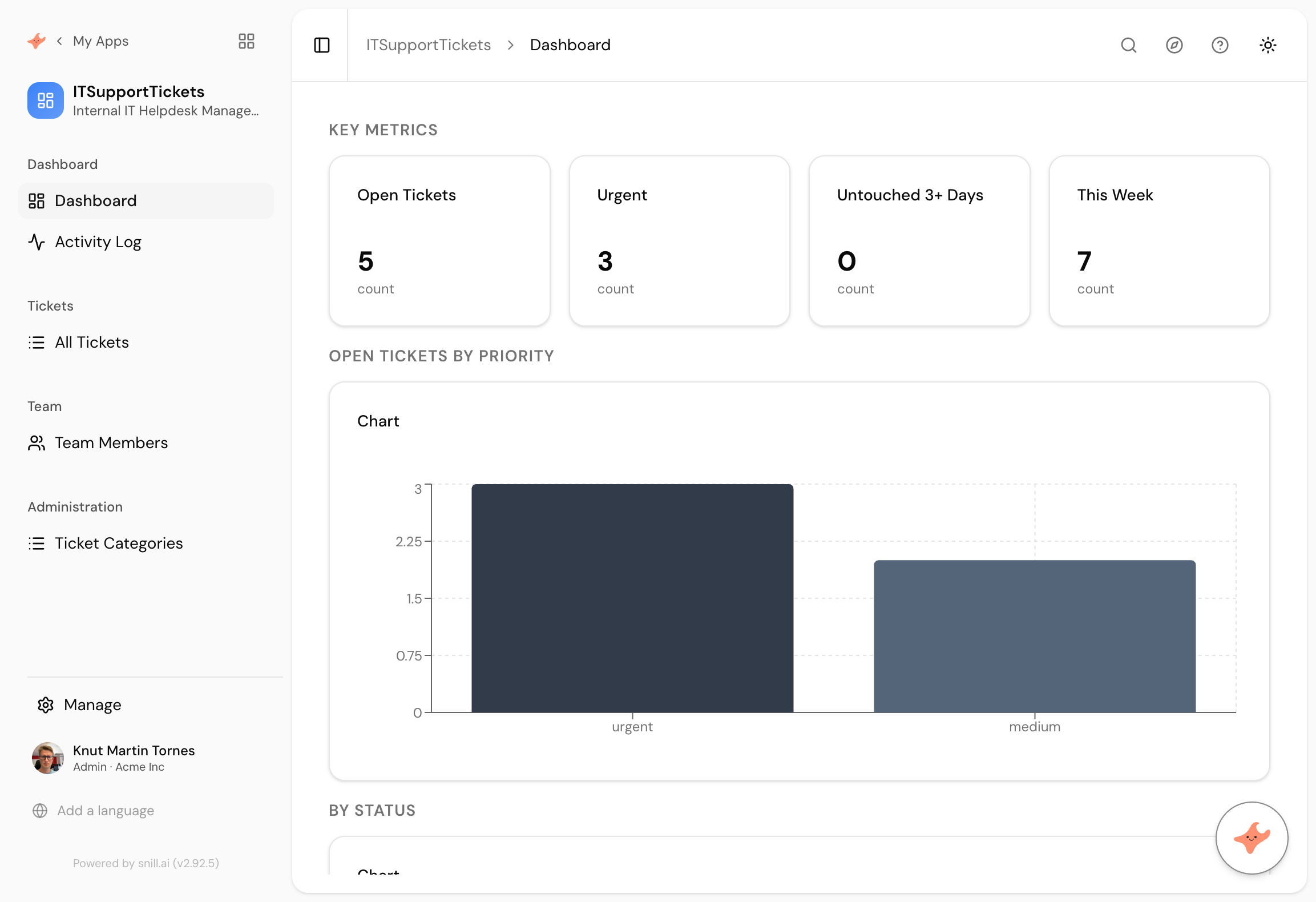
Built in 48 seconds, from that prompt alone.
What came back
Categories you can change
Hardware, network and access became records in a Ticket Categories collection rather than fixed options, so the list bends to how your team actually files things without anyone editing a schema.
Resolution held by the right people
Only the assignee or an IT lead can resolve a ticket. That rule is on the data, which matters because it is the difference between a queue and a queue people can quietly clear.
Priority separated from status
Urgent is not a status, it is a property of a ticket that is also in progress. Charting them apart is why the dashboard answers both what is on fire and what is moving.
An internal helpdesk starts as a Slack channel and stays there long past the point it works. Requests scroll away, two people fix the same thing, and nobody can say whether IT is drowning or idle because there is no number anywhere.
The register that fixes it is small: a ticket, a priority, an owner and a state. What makes it useful is not the form, it is that “what is open” becomes a question with an answer.
Priority is not status
The dashboard charts open tickets by priority and by status separately, which is a distinction plenty of tools collapse. A ticket can be urgent and in progress. Merging those into one list means the urgent things being actively worked look identical to the urgent things nobody has touched.
It also made categories into records rather than fixed options, so hardware, network and access are a list you edit rather than a schema change.
Where it did not come out clean
The ageing metric reads zero, and we are leaving it that way rather than staging a nicer screenshot.
Every sample ticket was generated within a day or two of the build, so nothing had gone untouched for three days. We asked the assistant to backdate a few, it moved several tickets out of this week, and the ageing counter did not follow. Rather than push it, we stopped.
This is the second time in ten builds that a data fix did not land the way we asked. It is worth knowing that the assistant is reliable at building and less predictable at surgically editing generated sample data, which matters much less on a real app where the data is yours.
Summary
An internal helpdesk is a queue with a priority and an owner, and it beats a Slack channel the moment anyone asks how much work is outstanding. This took 48 seconds from a paragraph, with categories as editable records and resolution restricted to the assignee or a lead. The ageing counter reads zero on fresh sample data and fills itself in real use. If you want comment threads, per-user views or response targets, those are the next three sentences.
Then change it by asking
The assistant stays with the app after it is built. It proposes each change and a person approves it, so nothing moves on its own.
- Add a comment thread to each ticket so the history is visible.
- Let people see only the tickets they raised.
- Add a target response time per priority.
- Give me tickets by category for the last quarter.
Frequently asked.
Why does the ageing counter show zero?
Because every sample ticket was created within a day or two of the app being built, so nothing had been untouched for three days yet. We asked the assistant to backdate a few and it moved some tickets out of this week without the ageing metric changing, so we left it. On a real helpdesk the number fills itself within a week.
Is this a replacement for Zendesk or Jira Service Management?
For an internal helpdesk of modest size, it covers the shape. What it does not do is email threading, customer portals or SLA automation. If your tickets arrive by email and need replying to inside the tool, buy a helpdesk.
Can people raise tickets without a login?
No. Everyone using the app is a user in it. Anonymous or email-in ticket raising is a different problem, and worth solving with a form or an integration through the REST API rather than pretending the register handles it.
How do we stop tickets being resolved by whoever feels like it?
That is the permission in the prompt. Restricting resolution to the assignee or a lead is enforced on the server, so it holds through the API as well as the screens.
What does it cost?
Snill is free to start for solo operators, with a Pro plan for teams. Your data and the app's full model are yours to export at any time, as CSV or JSON.
Describe it and see
Free to start. The app is generated in a minute or two, and you keep changing it in plain language.
Start free