Build an IT asset register by describing it.
Which laptop is whose, what's sitting in the cupboard, and what falls out of warranty next quarter. Here's the prompt and the app it produced.
Ask for it in one go
This is the exact prompt we used. Copy it, change the words that don't match your business, and paste it in.
Keep a register of our IT equipment. Each item has a type, a serial number, a purchase date and a warranty end date, and it can be assigned to an employee or sitting in stock. Show me what's unassigned and what goes out of warranty in the next 90 days. Only IT admins can change who an item is assigned to.
Built in 52 seconds, from that prompt alone.
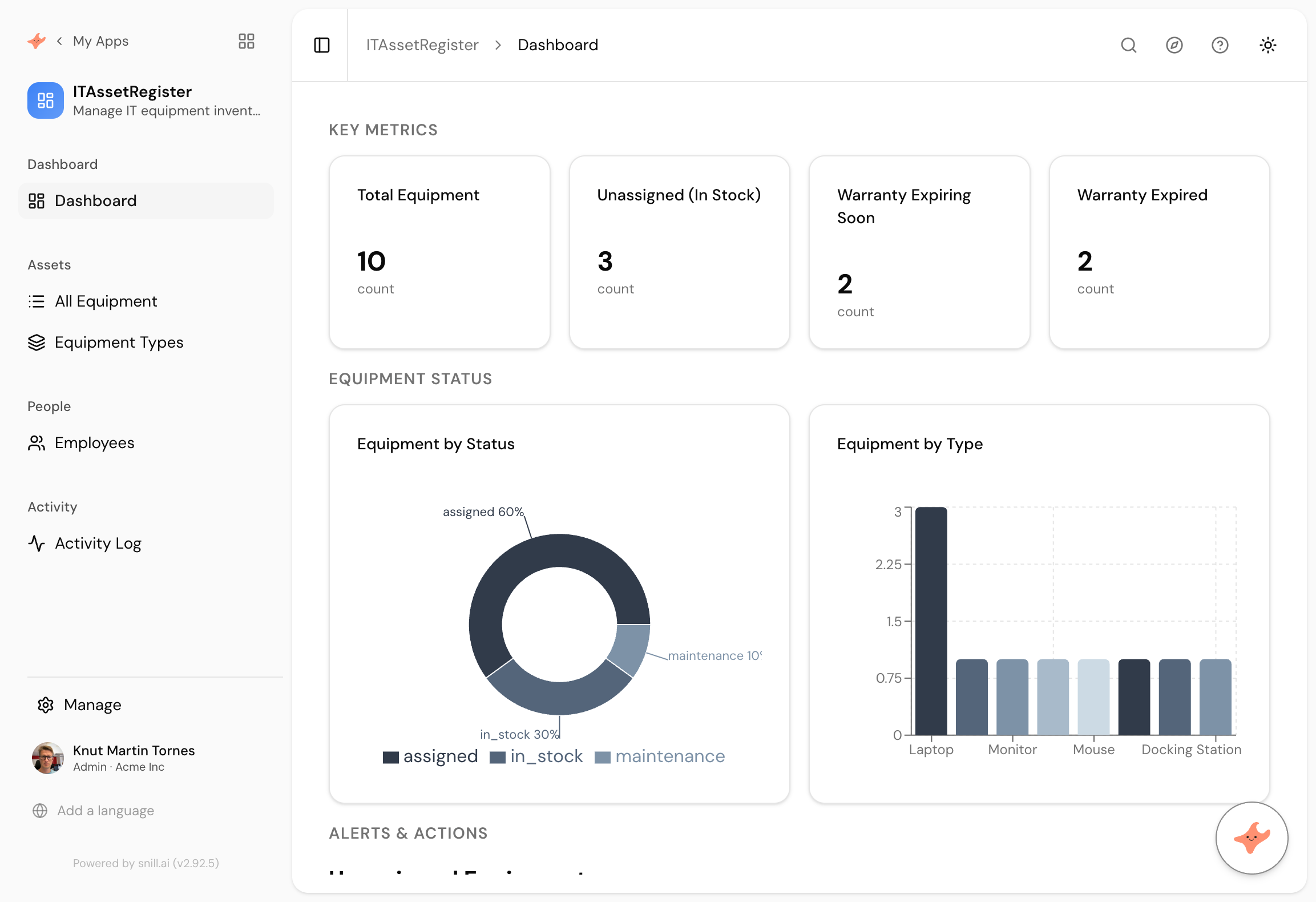
What came back
Equipment, types and people
It split equipment types into their own collection rather than leaving them as free text on each item, which is what stops the same laptop model being spelled four ways by four people.
Assigned or in stock, as a real status
Every item is assigned, in stock, or in maintenance, and the dashboard counts each. The restriction on who can reassign an item is a rule on the data rather than a hidden button.
Warranty as a question, not a column
Expiring soon and already expired are counted separately, so the register answers what you actually ask it, which is what needs replacing before it breaks.
Every company past about twenty people has a laptop problem. Not a shortage, an accounting problem. Somebody left and nobody knows if their machine came back. Three are in a drawer and two of those are out of warranty. The list exists, in a sheet, and it was last correct in March.
The fix is a register that more than one person can use, with a rule about who is allowed to change it and a screen that answers the two questions anyone actually asks. What’s spare, and what’s about to become the company’s problem rather than the manufacturer’s.
What it worked out on its own
We wrote “each item has a type”. It made Equipment Types a collection in its own right, so a laptop model is a record everyone picks rather than a string everyone retypes. That single decision is the difference between a register you can count and one where MacBook Pro, Macbook pro and MBP are three different things.
It also made assigned, in stock and in maintenance into a real status with counts on the dashboard, from one clause about items being assigned or sitting in stock.
The bit we had to fix
The first version generated purchase dates a few years back and warranty periods to match, so every single item was already out of warranty. Ten of ten expired, nothing expiring soon, and the panel we most wanted to show was flat.
One message sorted it. We described the mix we wanted, the assistant proposed the changes with an Apply button, and we approved them. Afterwards the register read two expiring soon and two expired, which is what a real one looks like.
If your use case has dates measured against today, expect to do this once. It takes about a minute.
Summary
An asset register is a small app with two real questions attached, which makes it a poor fit for a spreadsheet and an expensive thing to buy. This one took 52 seconds from one paragraph, and arrived with equipment types normalised into their own collection, a real status, and the permission rule we asked for. The sample warranty dates needed a single correction. If you want purchase price, per-employee views or a damage log, those are the next three sentences.
Then change it by asking
The assistant stays with the app after it is built. It proposes each change and a person approves it, so nothing moves on its own.
- Add the purchase price and show total asset value by department.
- Let employees see the equipment assigned to them and nothing else.
- Add a note field for damage and repairs against each item.
- Give me a report of everything bought more than four years ago.
Frequently asked.
How is this different from a spreadsheet?
Mostly in what happens when two people use it. A register in a sheet has no rule about who can reassign an item, no record of who changed what, and no way to show one person their own kit without showing them everyone's. All three come as standard here.
Can it track things other than laptops?
Yes, and the prompt never says laptop. Equipment type is a collection you fill in, so the same app handles phones, tools, vehicles or instruments. Change the words in the prompt to whatever your business calls them.
What if we already have a list in Excel?
Import it. Export your sheet to CSV, import it with field mapping, and describe the app around the records you already have rather than typing them in again.
Does it warn people before a warranty runs out?
The dashboard shows what expires in the next 90 days, and Snill can also send the warning by email. Triggers have a notify action, and on a sister app built the same way it created a daily scheduled trigger that emailed the record owner without being asked in those words. If you want that here, say so in the prompt. Webhooks are there too if you would rather push it into a system you already watch.
What does it cost?
Snill is free to start for solo operators, with a Pro plan for teams. Your data and the app's full model are yours to export at any time, as CSV or JSON.
Describe it and see
Free to start. The app is generated in a minute or two, and you keep changing it in plain language.
Start free