Build a staff certification tracker by describing it.
Who holds which certificate, when each one expires, and what lapses in the next 60 days. Here's the exact prompt we typed and the app it produced.
Ask for it in one go
This is the exact prompt we used. Copy it, change the words that don't match your business, and paste it in.
We need to keep track of staff certifications. Each employee can hold several certificates, each certificate has an issue date and an expiry date, and some need renewing every two years. Warn me when something expires within 60 days. Only HR can add or remove a certificate.
Built in 40 seconds, from that prompt alone.
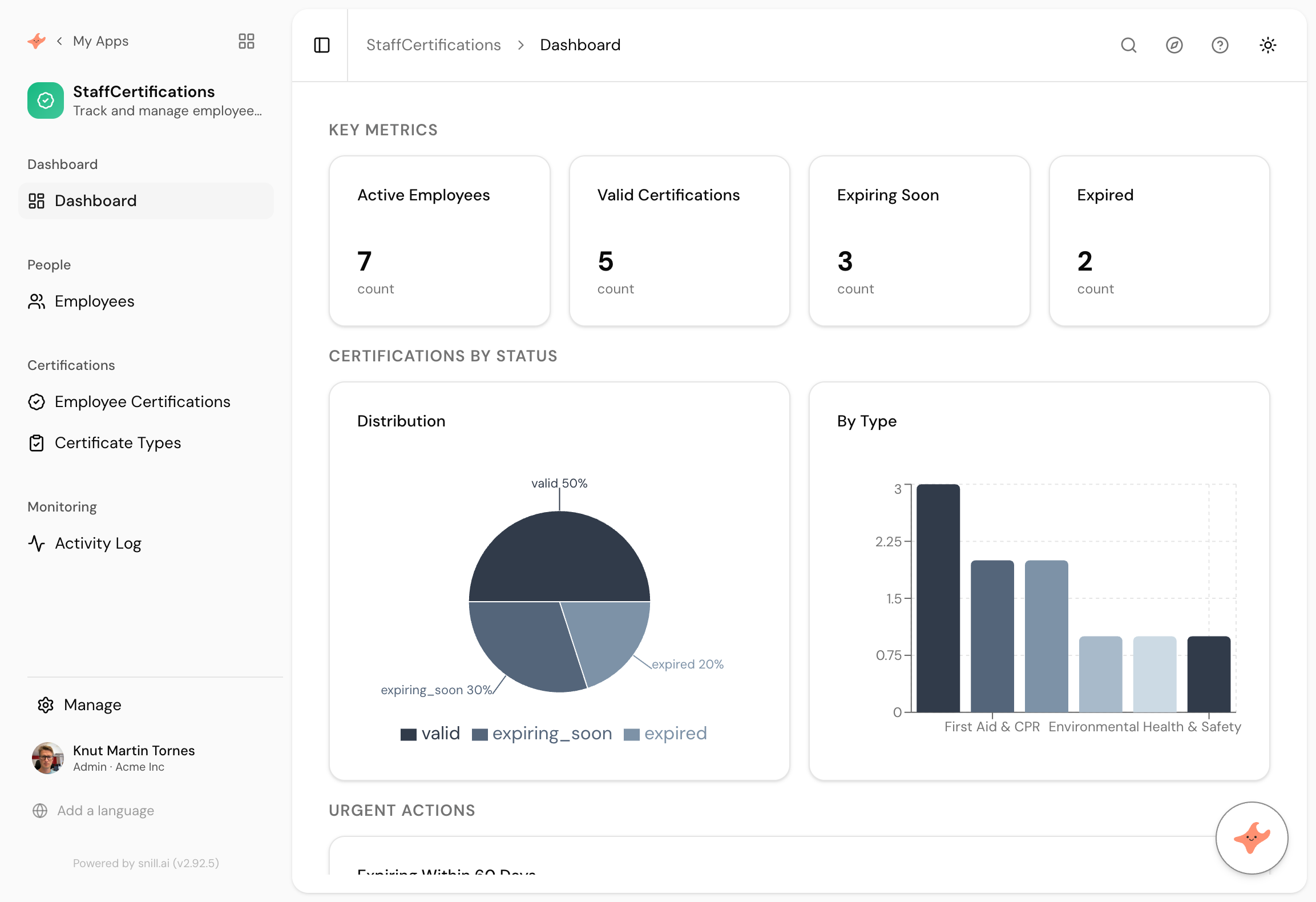
What came back
The right shape for many-to-many
Employees, Certificate Types, and Employee Certifications in between. One person holds several certificates and one certificate type is held by several people, and it built the join collection without being told to.
Dates that mean something
Every certificate carries an issue date and an expiry date, and the app derives a status from them. Valid, expiring soon, expired. Nobody maintains that status by hand.
The 60-day question, answered
An Expiring Within 60 Days panel on the dashboard, which is the whole reason anyone builds this. It's the prompt's last sentence turned into a screen.
Certification tracking is the kind of job a spreadsheet does badly and expensively. The sheet exists, somebody owns it, and it’s accurate right up until the week it matters. Then a forklift licence turns out to have lapsed in March, and the conversation is no longer about software.
What you want is small: a list of people, a list of certificate types, a record of who holds what, and a screen that answers one question. What’s about to run out?
The join table you didn’t have to think about
The prompt says “each employee can hold several certificates”. That single clause is a many-to-many relationship, and it’s the thing spreadsheets handle worst, because a row can only be one shape. Snill made three collections out of it: Employees, Certificate Types, and Employee Certifications sitting between them.
Nobody had to know the phrase “join collection”. You describe how the business actually works and the model follows.
The bit that went wrong
We’re keeping this in because it’s the honest part. The first version generated its sample data with issue dates in 2022 and 2023, so measured against today, every certificate had already expired. The dashboard was technically right and completely useless: valid certificates zero, expiring soon zero, and the Expiring Within 60 Days panel showing nothing at all.
One message fixed it. We said the sample dates were all in the past and asked for a realistic mix, and the assistant came back with a list of proposed changes and an Apply button. Nothing changed until we clicked it. Afterwards the dashboard read five valid, three expiring soon, two expired.
That’s worth knowing before you try this. Anything with dates in it can generate sample data that lands in the wrong place, and the fix is a sentence rather than a rebuild.
What “warn me” turned into
We wrote one clause: warn me when something expires within 60 days. We assumed that meant a panel on the dashboard, and said so on this page when we first published it. Then an email arrived the next morning.
Snill had read “warn me” as an instruction to actually warn somebody. It built a scheduled trigger called Expiration Warning that runs every day, checks which certificates have moved inside the window, and emails the person who created the record, with the employee name and certificate type filled into the subject line. It also stored the 60 from our sentence as a variable, so changing the warning period is one number rather than an edit to the rule.
None of that was asked for in those words. It is the clearest example we have of the difference between generating a screen and generating a system, and we got it wrong on this page for a day before the product corrected us.
Summary
A certification register is a few related lists and one urgent question, which is exactly the sort of internal app that’s tedious to buy and quick to describe. This one took 40 seconds from a single paragraph, including a many-to-many relationship we never named and a 60-day warning panel we asked for in passing. The sample data needed one correction, which the assistant proposed and we approved. It also quietly set up a daily email warning that we did not ask for in those words. If your version needs providers, costs, uploads or a quarterly report, those are the next four sentences.
Then change it by asking
The assistant stays with the app after it is built. It proposes each change and a person approves it, so nothing moves on its own.
- Add the training provider and the cost to each certificate.
- Show each employee their own certificates and nobody else's.
- Let people upload a scan of the certificate.
- Give me a report of everything expiring next quarter, by department.
Frequently asked.
What was wrong with the sample data?
The first version generated certificates with issue dates in 2022 and 2023, so against today's date every single one had already expired. The app was correct and the dashboard was useless, because the panel we most wanted to show was empty. One message fixed it.
Does this replace an HR system?
No. It tracks certificates, expiry and renewal, which is one job that HR systems often do badly or charge a module for. If you need payroll, contracts and absence in one place, buy an HR system. If you need to stop a forklift licence lapsing unnoticed, this is that.
Can it email people before a certificate expires?
Yes, and it set that up without being asked. The prompt said warn me when something expires within 60 days, and Snill built a scheduled trigger that runs daily, finds certificates inside the window and emails the person who created the record. We only found out when the email arrived the next morning.
Who can change what?
You describe it. We asked for HR only, so adding and removing certificates is restricted while everyone else can still see the register. Access rules are enforced on the server, not hidden in the interface, so the same rule holds through the REST API.
What does it cost?
Snill is free to start for solo operators, with a Pro plan for teams. Your data and the app's full model are yours to export at any time, as CSV or JSON.
Describe it and see
Free to start. The app is generated in a minute or two, and you keep changing it in plain language.
Start free