Give your AI somewhere to keep what it finds
Useful things come out of AI conversations every day, and most of them are gone by next week. In this post we'll show a small app we use ourselves, where the AI writes what it finds straight into a real system we can search, group and ask questions about later.

Your AI found the answer last Tuesday. Good luck finding it now.
It's somewhere in a chat history, in one tool, on one machine. Ask a different tool and it knows nothing about it. Let a scheduled agent run overnight and its findings sit in a log nobody opens.
The built-in memory features help a little, but they belong to one vendor, you can't see what's in them, and you can't group, filter or share what they hold. So we built the simplest thing that fixes it: an app with a place to put things, and an AI that puts things there.
The app is three collections
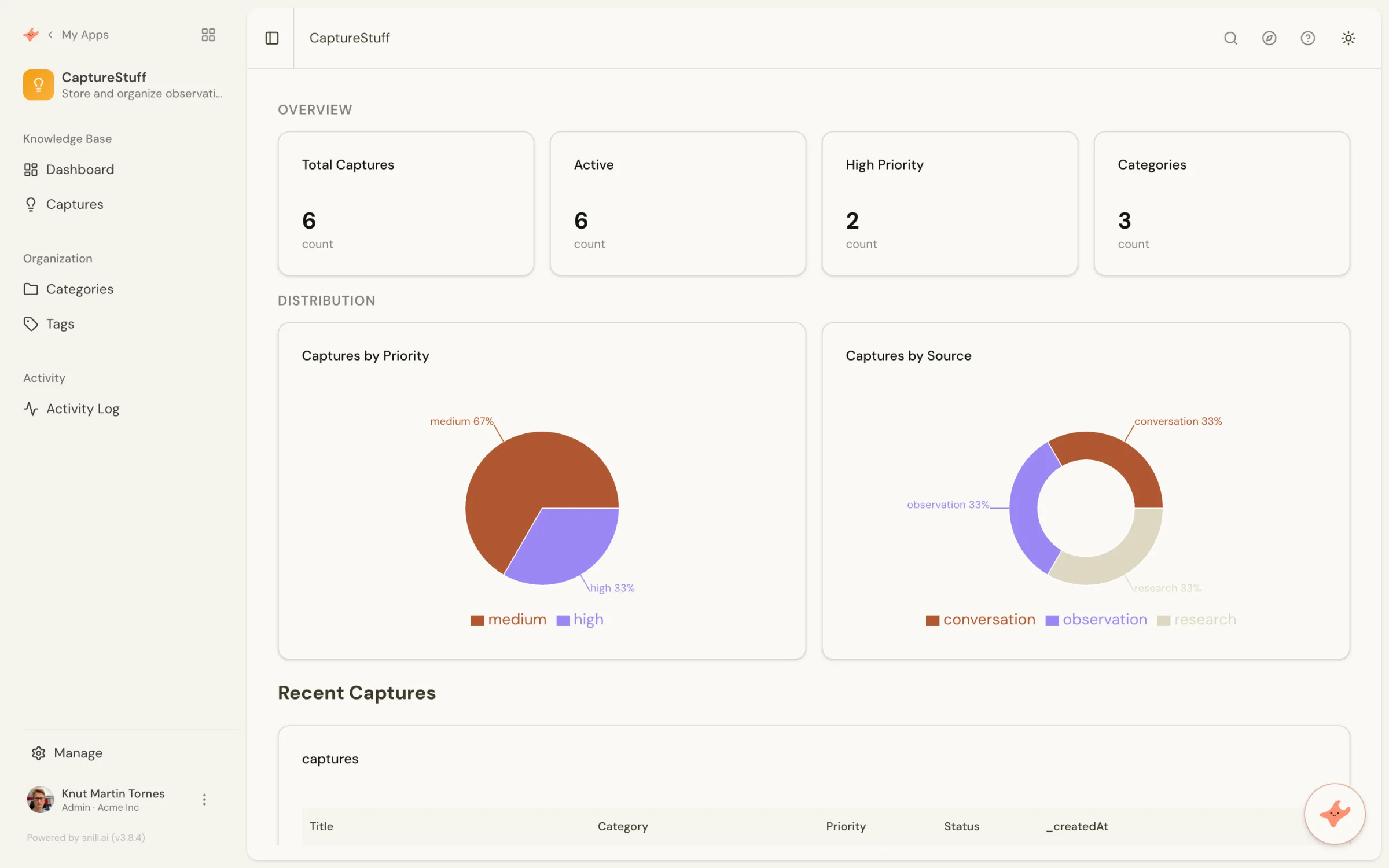
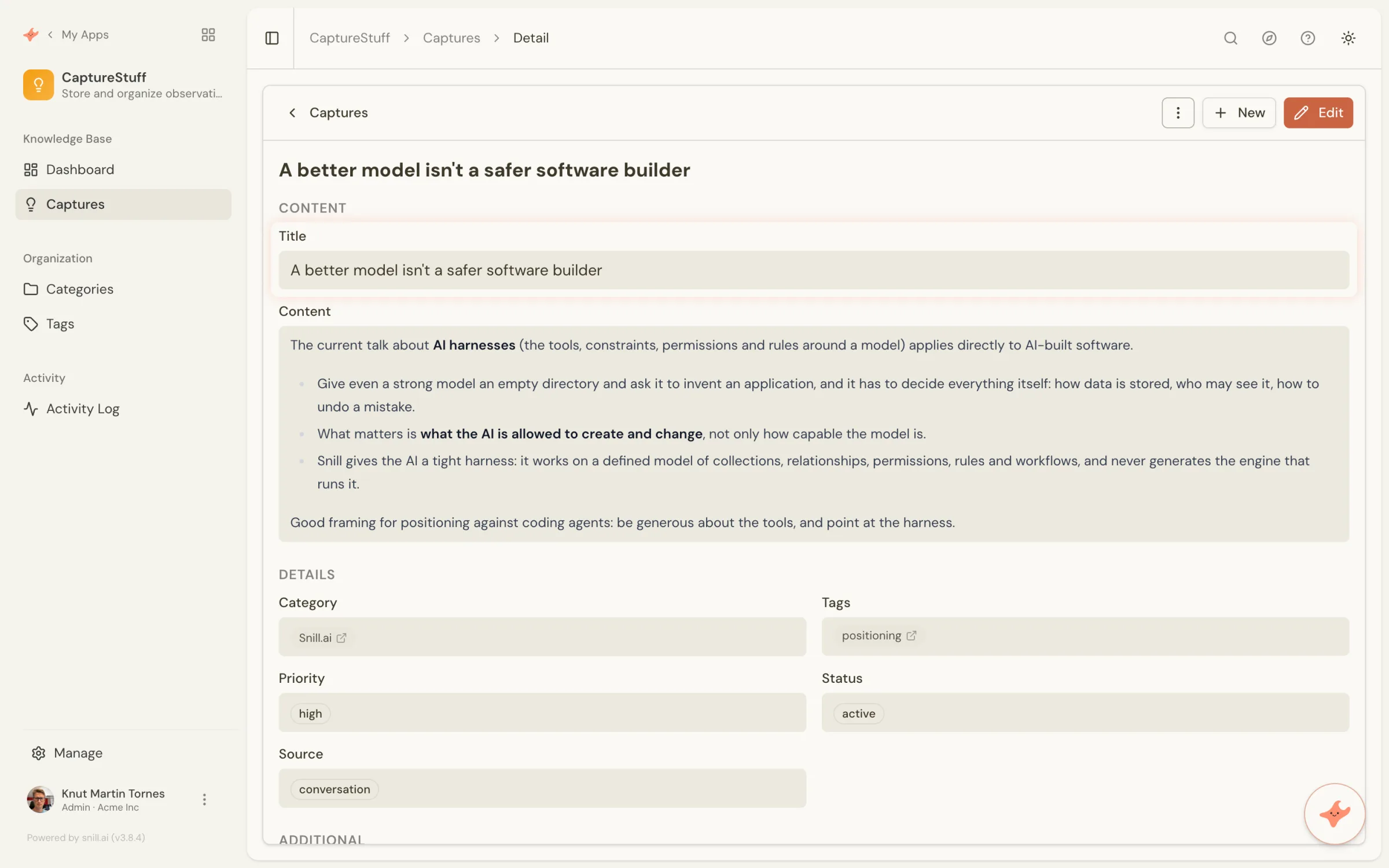
It's called CaptureStuff, and there's not much to it. Captures hold a title, the write-up itself as Markdown, a category, tags, a priority, a status, where it came from (an observation, some research, a conversation), any links, and a note. Categories and Tags are their own collections, so a capture links to them instead of repeating the words.
That's the whole data model, and it took a paragraph of description to get. The dashboard came with it.
Connecting the AI takes a minute
If MCP is new to you: it stands for Model Context Protocol, and it's a small standard for letting an AI tool reach something outside itself. The tool connects, asks what's on offer, and gets back a list of things it can do (list the collections, find records, create one). Think of it as a plug socket. One shape, and anything that fits can connect, so you're not wiring up a separate integration for every tool. Claude, ChatGPT and Cursor all speak it.
Every Snill app has its own MCP endpoint. You copy the URL from Manage → Connect an agent, paste it into Claude, ChatGPT, Cursor or whichever client you use, and sign in. There are no keys to paste anywhere.
On the consent screen you choose what the agent may do beyond reading. We leave creating and updating on, and deleting off. Deleting starts off, and it's a separate choice for every connection, so an agent that's meant to write notes can't quietly remove them.
The agent then acts as you. It sees what you can see, it can change what you can change, and nothing more. It can't touch the data model either: the collections and fields stay exactly as they are, whoever is connected.
What it looks like in daily use
You're in a conversation, something useful comes out of it, and you say so: "save that as a capture, category Snill.ai, tag it positioning." The agent writes the record, with the write-up as Markdown and the fields filled in.
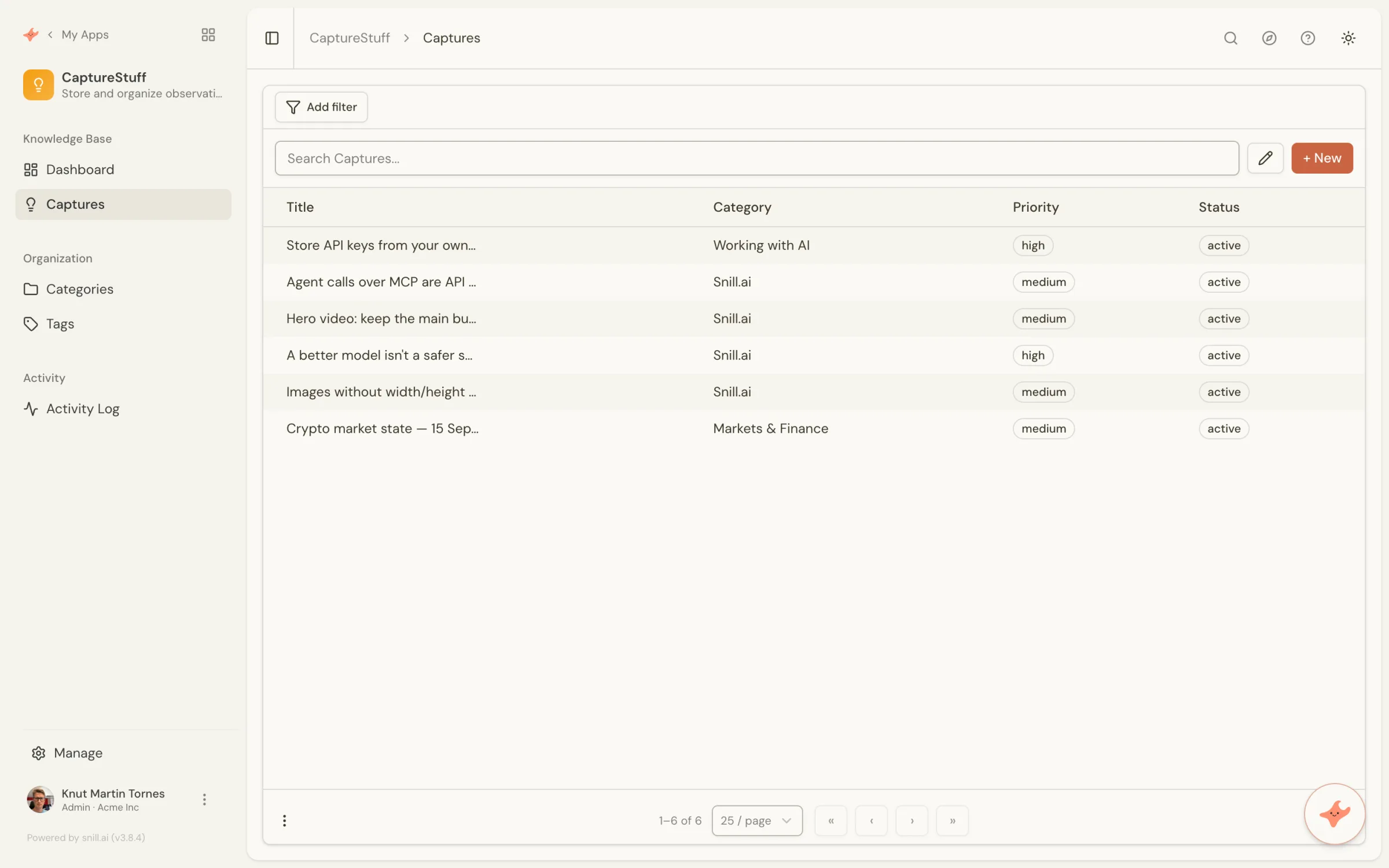
The five captures below were written by Claude Code during a working session on this website, as each one came up. One of them holds the idea behind a section in our post on AI-built software.
Later, in a different tool on a different day, you ask "what do we have on API keys?" The agent searches across the text fields it's allowed to read and comes back with the matches and a snippet from each. It can total things up too, so "how many captures are high priority, by category" is one call rather than a spreadsheet.
And none of it needs the AI. It's a Snill app, so the list, the filters and the record are right there.
You can also just ask the app
The outside agent is one way in. The other one is already sitting in the app: every Snill app has an assistant that knows the data model, so you can ask it things without connecting anything at all.
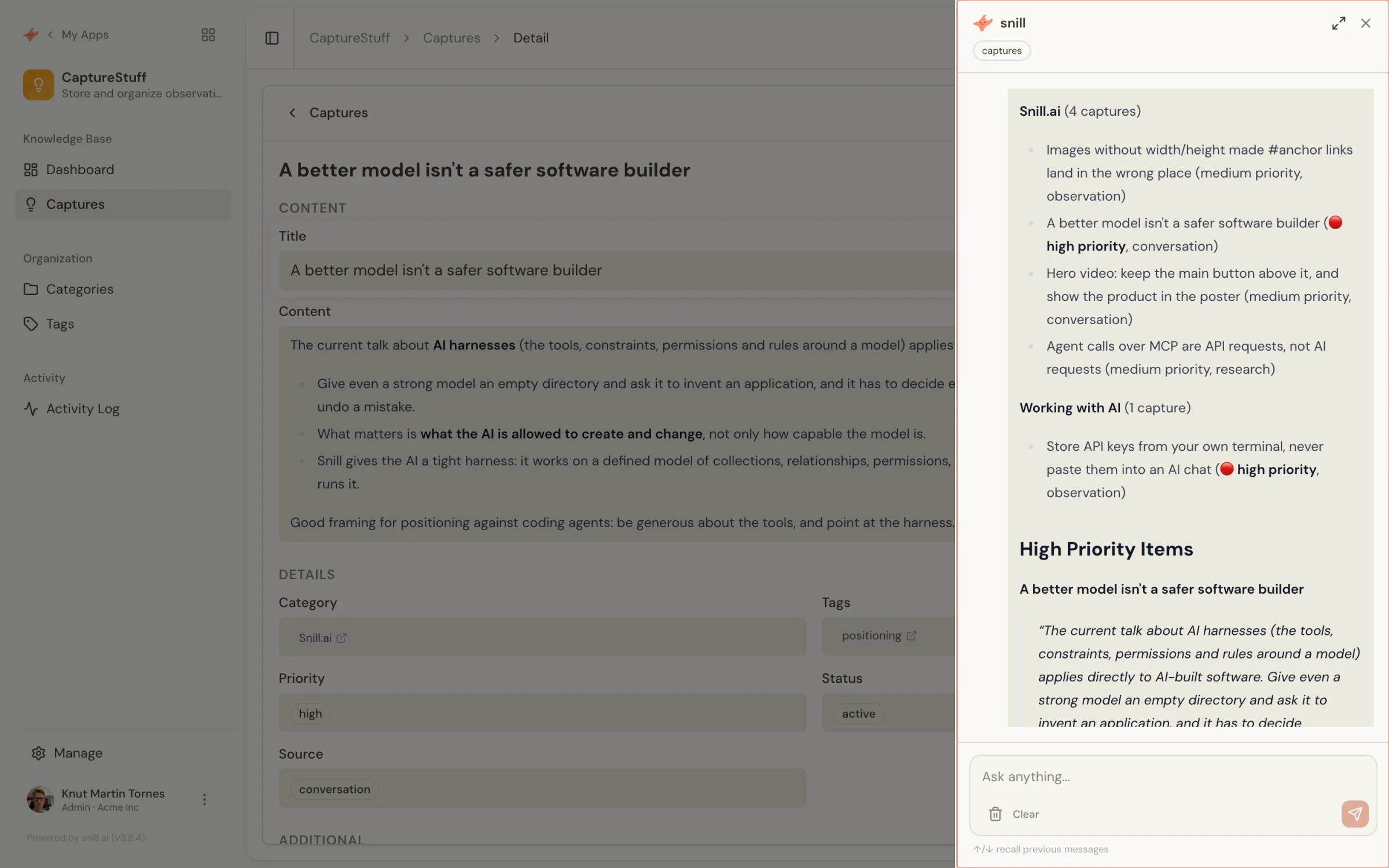
We asked it to summarise the captures by category and say which ones are high priority. It grouped them, pulled the high-priority ones out, and quoted what they say.
Ask for a report and you get a formatted one, with an executive summary, tables and charts, and buttons to print it as PDF or export it as CSV or JSON. So a month of captures turns into something you can send to someone without opening a spreadsheet.
Worth knowing: the assistant can also change the app, but only if you're an admin, and it never applies a structural change on its own. It proposes, shows you what it would do, and waits for you to approve. Snill's AI runs in the EU.
This isn't a second brain
There's a whole shelf of tools for keeping what you learn: Obsidian, Notion, Tana, Mem, Capacities. They're good at what they do, and several of them talk to AI tools as well. If you want free-form notes, backlinks and a daily page to think in, use one of those.
What we wanted was narrower: the same fields every time, so an agent can fill them in and nothing drifts; access rules when colleagues join; an API so other things can read the result; a dashboard that counts. That's a small database app rather than a notebook. If what you're collecting wants structure more than prose, this approach fits.
Why a real system rather than a notes file
A folder of Markdown files would hold the same words. What it wouldn't give you is the rest:
- Structure that stays put. The agent fills in fields that already exist. It can't invent a new shape halfway through the month, so what you collect in March still lines up with what you collect in September.
- Your rules, not the agent's. The connection acts as you, with your access. Add colleagues and each of them sees what their role allows.
- A record of what happened. Every change is in the activity log, with who did it and when.
- Somewhere to grow into. A dashboard, a review status, a weekly digest by email, a webhook into something else. It's an app, so it can do app things.
- A way for other things to read it. Every app comes with a REST API and an OpenAPI spec, and you can hand out a key scoped to a single collection, read-only. So the captures you mark as public can feed a page on your website, a team dashboard, or a weekly summary somewhere else, without copying anything by hand.
- A way out. Export to CSV or JSON whenever you want.
It also costs nothing to run at this size. Agent calls are API requests, not AI requests, so they don't touch your daily AI limit, and the free plan holds 1,000 records.
The same pattern, other jobs
Once an agent can write into a structured app, the pattern repeats:
- Research log - competitors, prices, releases, each with a date and a source.
- Decision log - what we decided, why, and what we'd have to see to change our minds.
- Customer signals - what people asked for, grouped by theme, written down as it comes up in support chats.
- Agent run log - scheduled agents write what they found and what they did, and a person reviews it in one place instead of opening run logs.
They're all the same shape: a few collections, an agent with create and update, and a person who reads the result in an app.
Setting one up yourself
- Create a free account at snill.ai. No card, and the free plan holds 1,000 records.
- Describe the app in a paragraph, for example: "a capture app for observations from AI conversations, with captures (title, markdown content, category, tags, priority, status, source, related links, notes), plus categories and tags as their own collections, and a dashboard showing captures by category and by priority." You get the collections, the screens and the dashboard.
- Copy the MCP URL from Manage → Connect an agent in your new app.
- Add it to your agent as an MCP server (Claude, ChatGPT, Cursor, or whatever you use), sign in, and on the consent screen leave creating and updating on and deleting off.
- Try it. Ask the agent to save your next useful finding as a capture, then open the app and look at the record it wrote.
From there it's yours to shape: add a field, add a review status, ask the assistant for a weekly report. And if the shape turns out wrong, change it, because the structure is yours to decide.
Summary
AI tools are good at finding things and bad at keeping them. Giving them a small app to write into fixes that, and it takes about as long as describing the app. Connect over MCP, leave delete switched off, and let the agent fill in a structure you decided on. You get to search it, group it, share it and take it with you, which is more than any chat history will ever give you.
Build your own capture app → - it's free to start, and your agent can be writing into it a minute later.