Run incident reporting on a real system — not paper forms and inboxes.
Incidents, severity triage, and corrective actions in one ready-made app — with AI that drafts the report from a photo. Start it in one click, then shape it by chatting with Snill.
Free template · runs on your Snill account
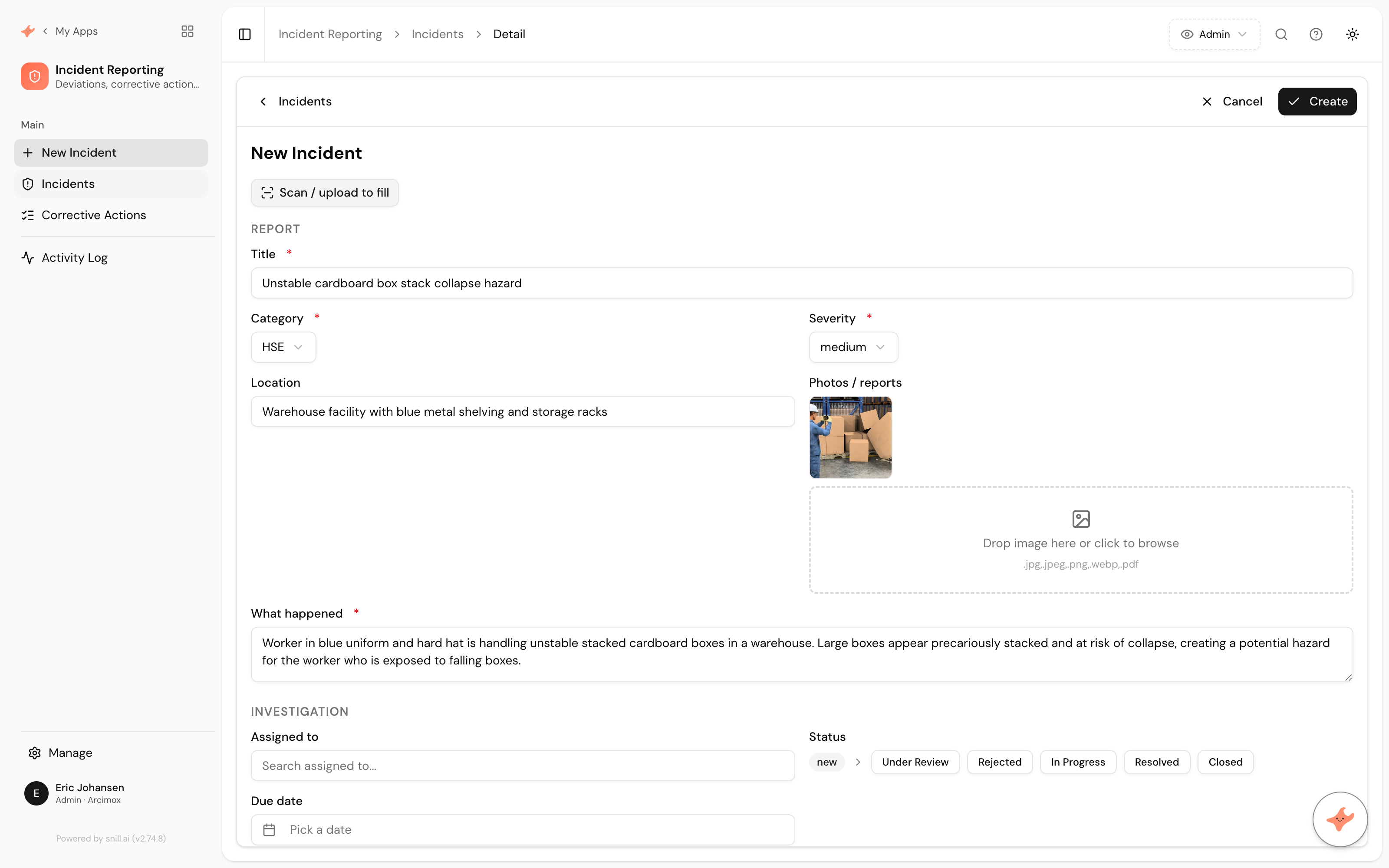
Health and safety incidents don’t wait for someone to be at a desk — they happen on site, on the floor, in the field. Too often they end up in paper forms, photos on a phone, and email threads that no one can total up at audit time. The Incident Reporting App template gives you the whole system on day one.
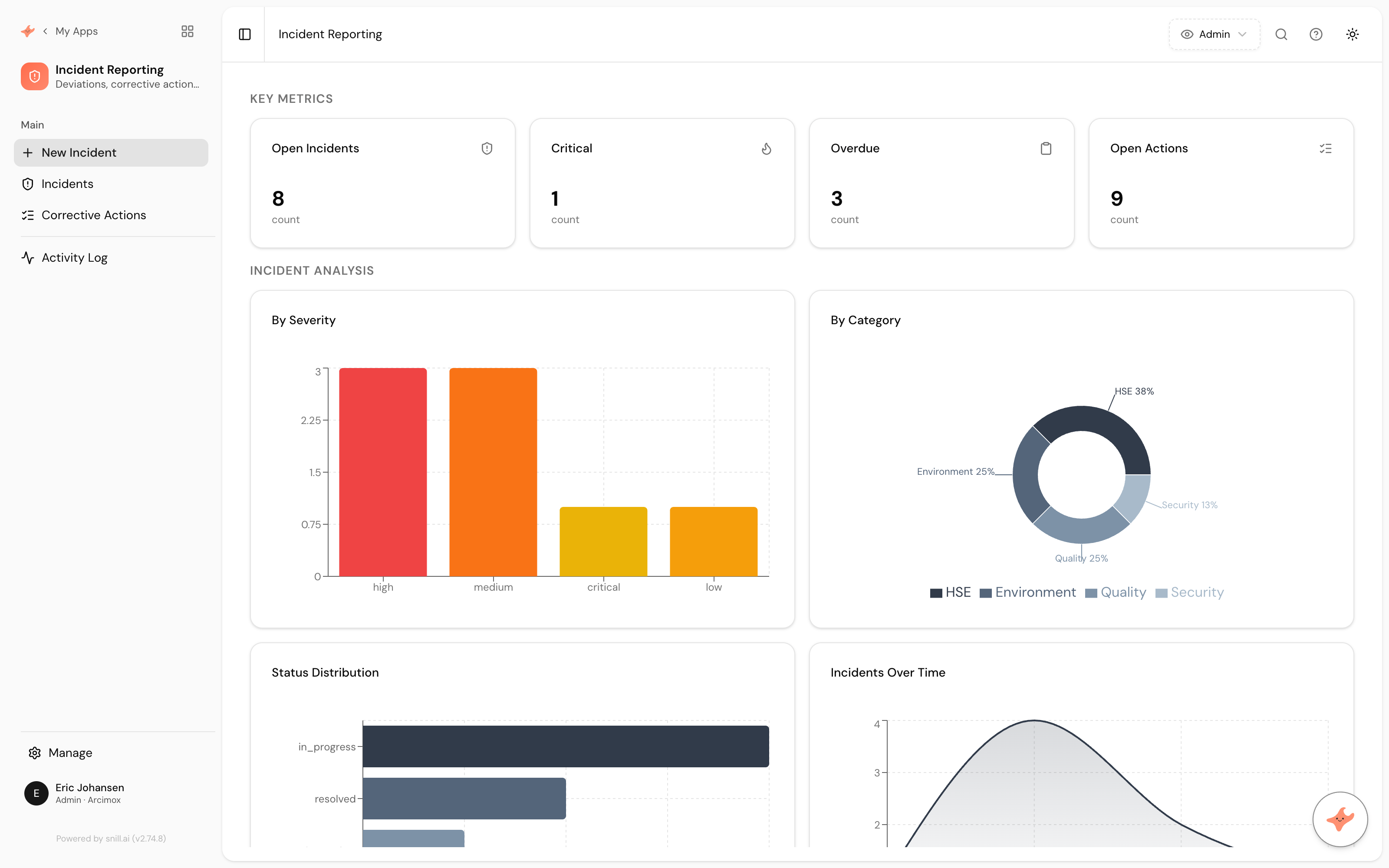
Start from the template and Snill generates a complete, relational app: Incidents and linked Corrective Actions, with severity triage, a new → under review → in progress → resolved → closed workflow, and an HSE dashboard surfacing open, critical, and overdue items. Reporting is fast — snap a photo or upload a PDF and the AI drafts the report for you. It’s a real database-backed system with a REST API and access control — not a spreadsheet with a skin on it.
Because Snill built it, you can change it just by describing what you want. Add a site or department, route critical incidents to a manager, restructure the dashboard — keep talking, and the app keeps up.
Faster reports. Nothing falls through the cracks.
Report an incident from your phone in seconds
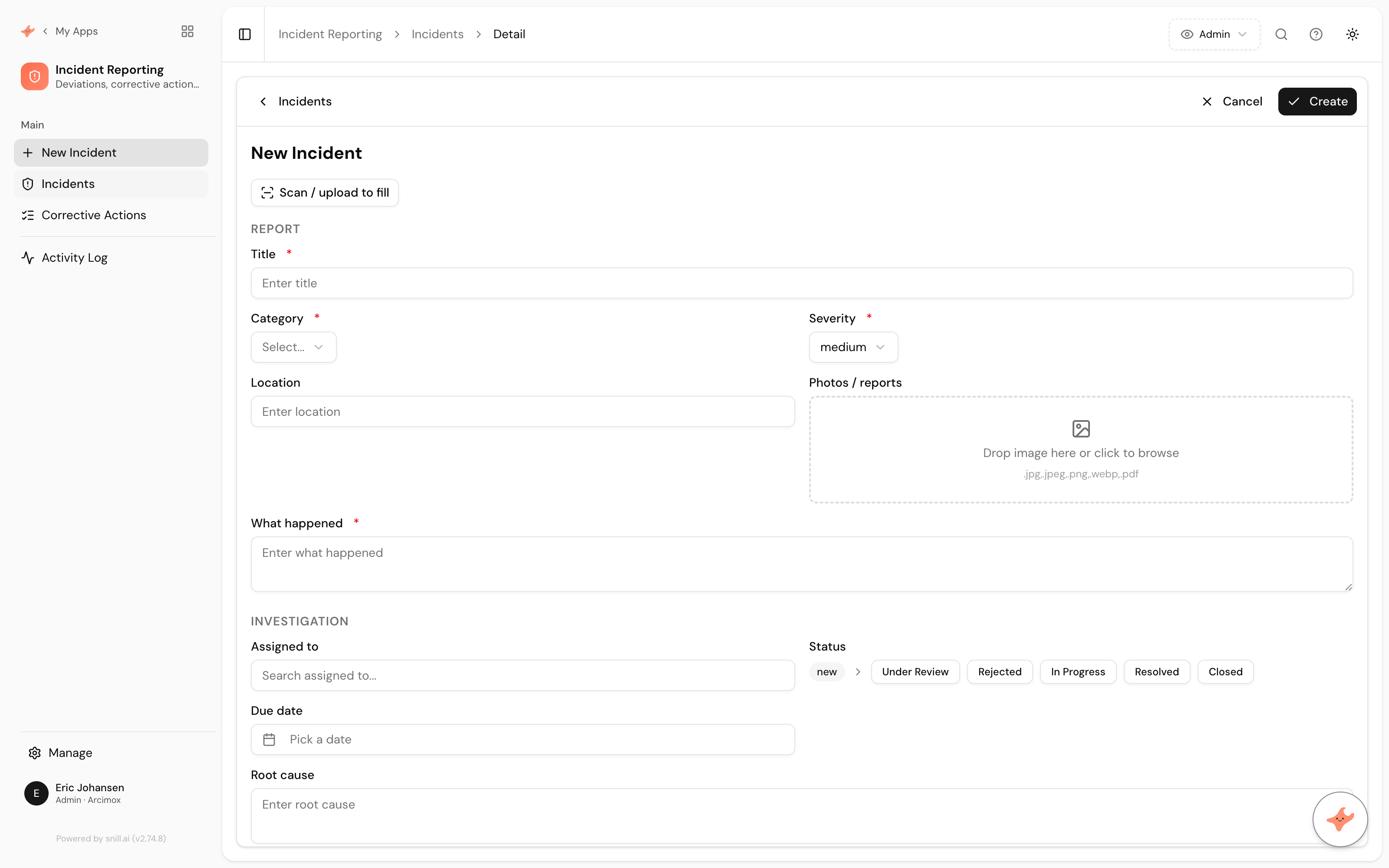
Snap a photo or drop in a PDF and let the AI draft the report — title, category, severity, location, and what happened — ready to review and save. No blank form to wrestle with on site.
Triage by severity and never miss an overdue action
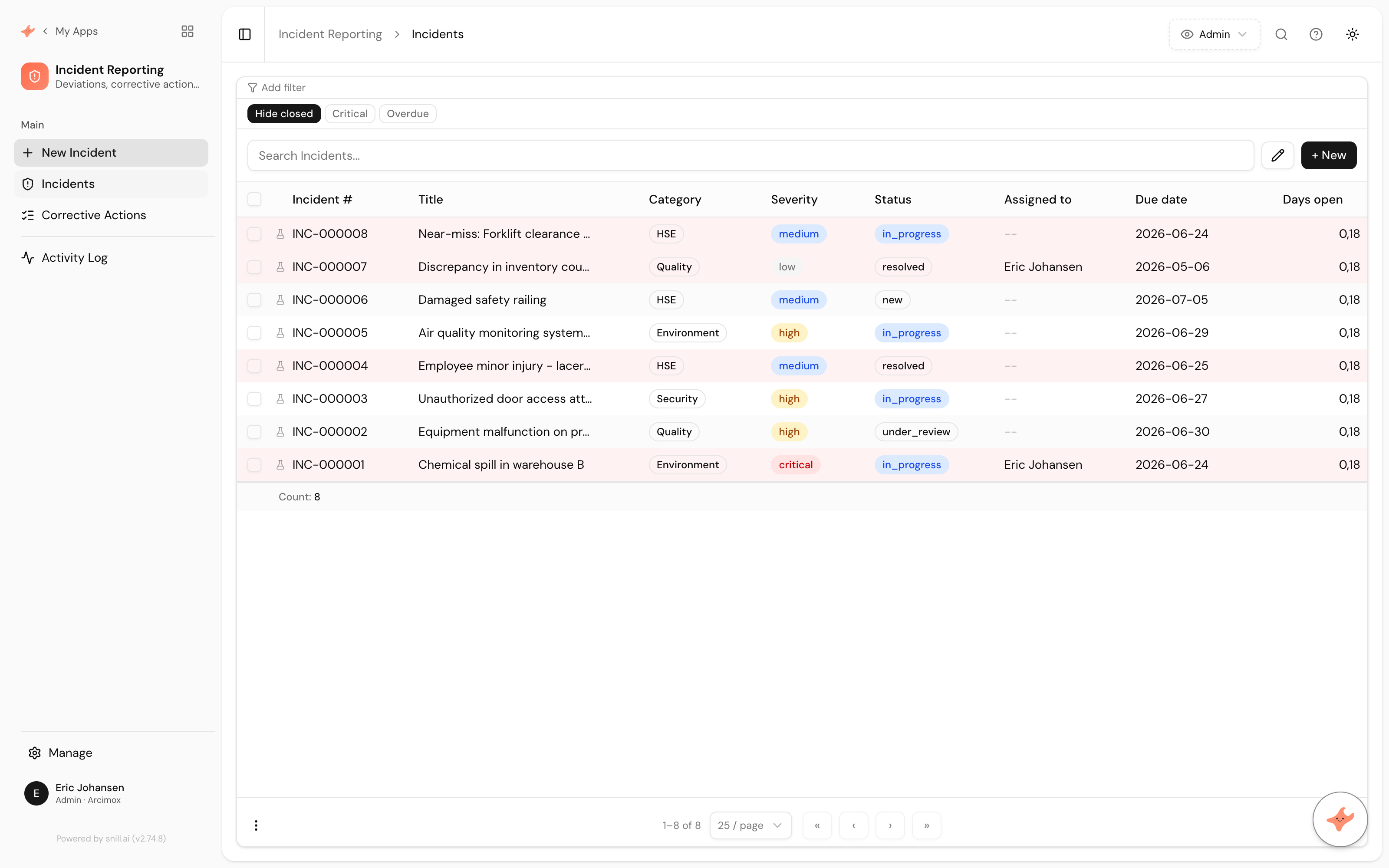
Incidents carry a low → critical severity with color-coded badges, and corrective actions get owners and due dates with due/overdue alerts — so the urgent stuff stays visible.
Run a real review workflow
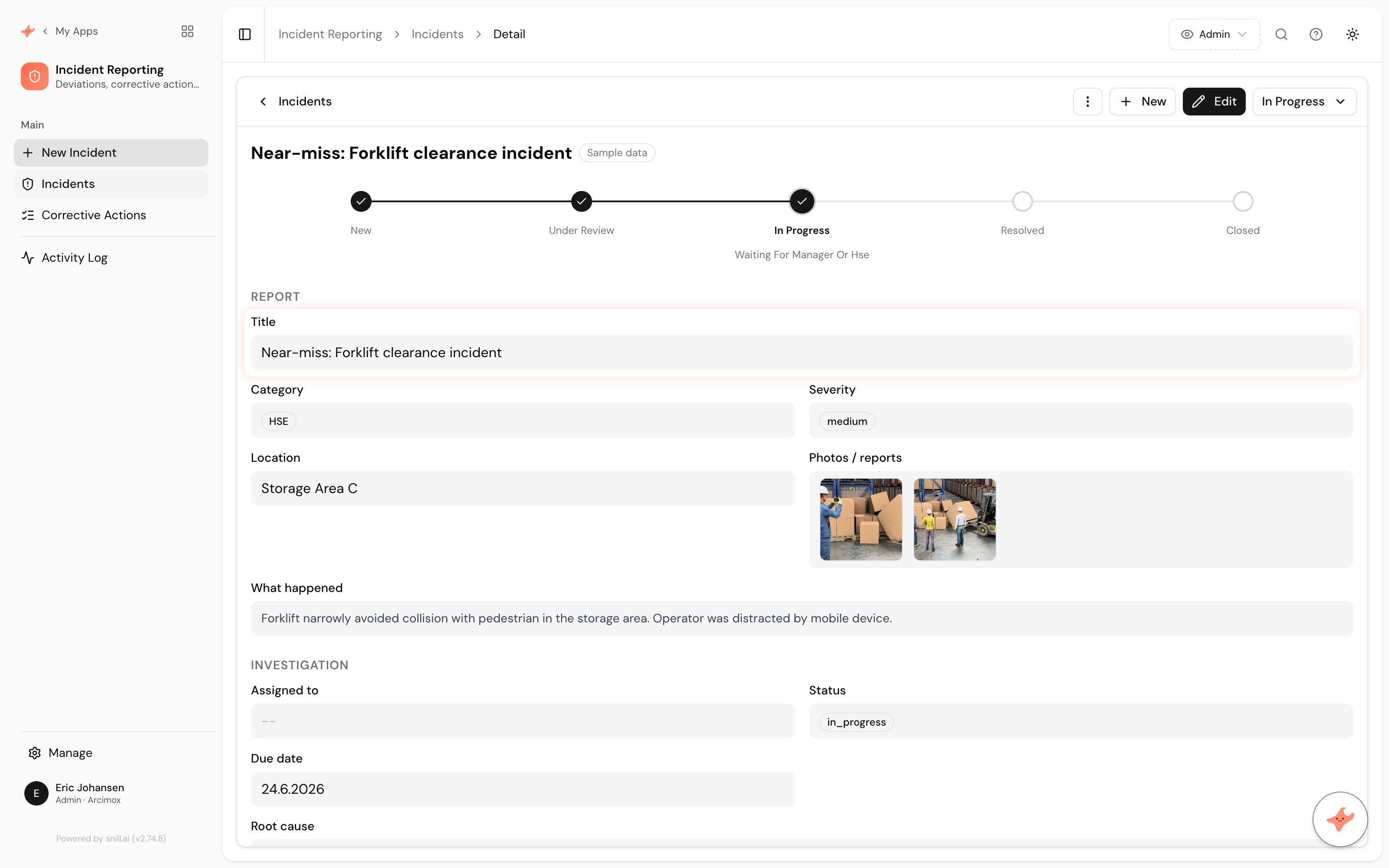
Each incident moves new → under review → in progress → resolved → closed, with the investigation and root cause recorded — a tracked process, not a static form in a folder.
Everything it handles.
- Snap a photo or upload a PDF and let AI fill in the incident report
- Severity triage (low → critical) with color-coded badges and overdue row highlighting
- Role-based review workflow: new → under review → in progress → resolved → closed
- Corrective actions linked to each incident, with owners, due dates and due/overdue alerts
- HSE compliance dashboard: open, critical and overdue incidents, charts and urgent items

Built on Snill.
Ask questions in plain language and get summaries, reports, and charts you can print or share.
Describe a change and Snill makes it — or edit fields, layouts, and dashboards in the visual UI.
Every app ships a REST API, webhooks, multi-user roles, and one-click version rollback.
Import and export CSV or JSON anytime, with daily backups you can restore in a click.
Frequently asked.
What is the Incident Reporting App template?
It's a ready-made Snill app (a 'Snapp') for HSE incident reporting: it sets up Incidents and linked Corrective Actions with severity triage, a review workflow, and an HSE compliance dashboard. Snill generates the whole system — database, dashboards, and a REST API — from the template, and you customize it in plain language.
How does the AI photo scanning work?
When reporting an incident you can snap a photo or upload a PDF and hit 'Scan / upload to fill'. The AI reads it and auto-fills the report — title, category, severity, location, and what happened — and attaches the photo, so you just review and save.
Do I need to write code or design a database?
No. The template comes with a complete relational data model, workflow, and dashboard. You start from it and refine in plain language or the visual editor — Snill handles the database, API, and access control.
What can I customize after starting from this template?
Everything. Add fields (e.g. a site or department), new collections, change the dashboard, or adjust who can review and close incidents — by asking the AI or using the visual Appmodel Editor. Every change is versioned and reversible.
How does the review workflow work?
Incidents move through new → under review → in progress → resolved → closed, with severity triage, an investigation and root-cause record, and corrective actions linked to each incident. Owners and due dates drive due/overdue alerts.
Can my whole team use it?
Yes. Snill apps are multi-user with role-based access control at the collection and field level, so reporters, reviewers, and HSE admins each see and do what they should.
Does it come with an API?
Yes — every Snill app gets a REST API with an OpenAPI spec, scoped API keys, and webhooks, so you can connect incidents to your reporting, BI, or notification tools without a developer.
What does it cost?
The Incident Reporting template itself is free. It runs on your Snill account — free for solo operators (2 apps, 1,000 records, 20 AI requests/day), or Pro at $29 a month flat, which covers one Admin and five Members and raises the limits on apps, records and AI. You're paying for your Snill account, not the template.
Can I import my existing incident data?
Yes. Every collection supports CSV and JSON import with field mapping, so you can bring existing incidents and corrective actions into the app.
Start from the Incident Reporting template.
It's free and runs on your Snill account. Create it in one click, then describe a change and watch it happen.